nf-core/seqsubmit
nf-core pipeline for data submission to ENA
Introduction
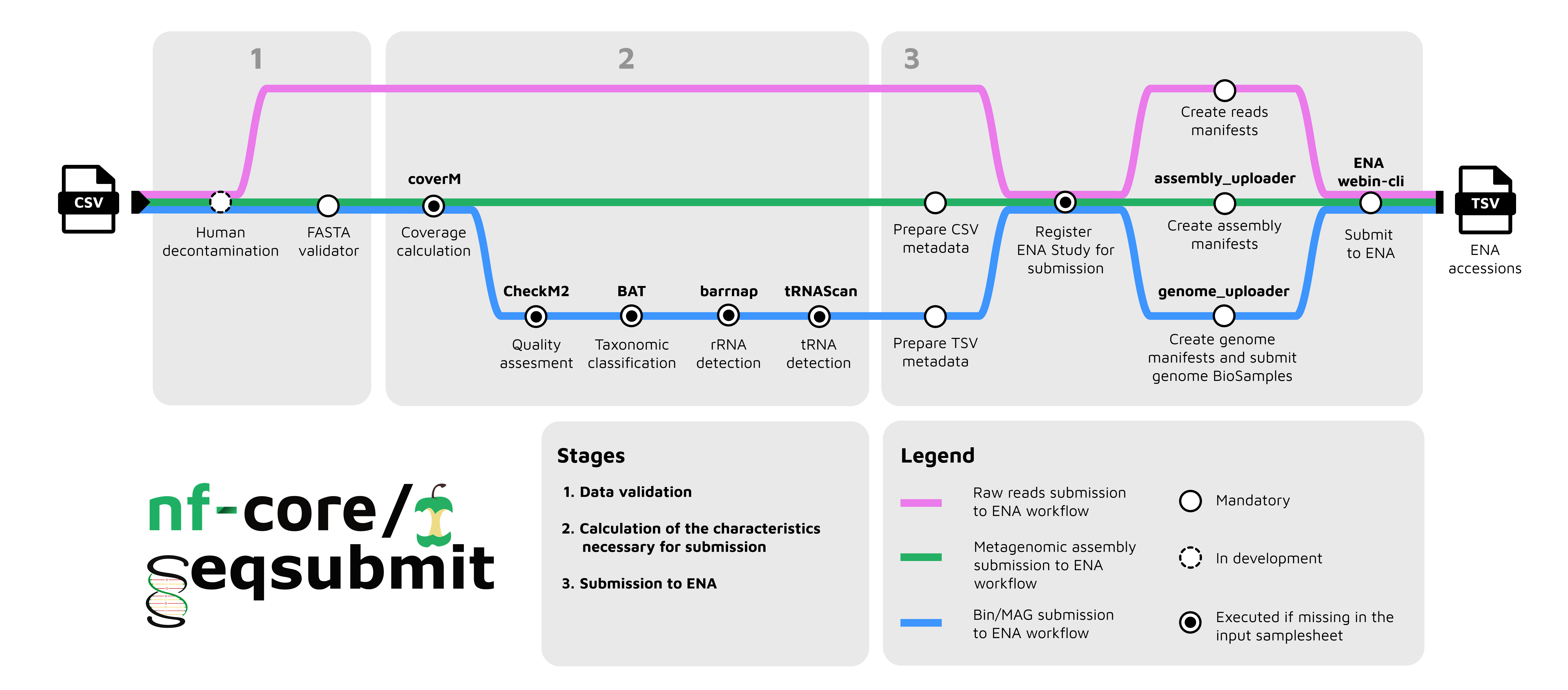
nf-core/seqsubmit is a Nextflow pipeline for submitting sequence data to ENA. The pipeline currently supports the following submission modes, each routed to a dedicated workflow:
reads— raw sequencing reads submission via theREADSUBMITworkflow (pink)metagenomic_assemblies— assembly submission via theASSEMBLYSUBMITworkflow (green)mags— metagenome-assembled genomes (MAGs) submission via theGENOMESUBMITworkflow (blue)bins— bins submission via theGENOMESUBMITworkflow (blue)
Each workflow has its own samplesheet structure, prerequisites, and limitations — they are briefly described below. See the usage documentation for more detailed explanations.
Requirements
-
Nextflow
>=25.04.0 -
A Webin account registered at https://www.ebi.ac.uk/ena/submit/webin/login
Set your Webin credentials as Nextflow secrets:
nextflow secrets set ENA_WEBIN "Webin-XXX"nextflow secrets set ENA_WEBIN_PASSWORD "XXX"Make sure to replace the values above with your own credentials.
-
Provide either a study accession or a study registration metadata file for the study the submission will be associated with. See the Submission study section of the usage documentation for details.
-
Depending on the chosen mode, samples, reads, or metagenomic assemblies must be pre-submitted to ENA to obtain the corresponding accessions, which you then reference in your submission. Refer to the relevant mode section in the usage documentation for details.
Input samplesheets
reads mode
Example:
id,sample_accession,fastq_1,fastq_2,platform,instrument,library_source,library_selection,library_strategy,insert_size,library_name,descriptionillumina_run_001,SAMEA1234567,data/reads_R1.fastq.gz,data/reads_R2.fastq.gz,ILLUMINA,Illumina HiSeq 2000,GENOMIC,RANDOM,WGS,500,HiSeq_library_001,Illumina sequencing of sample XYZSee the reads mode section of the usage documentation for more details.
metagenomic_assemblies mode
Example:
id,fasta,fastq_1,fastq_2,coverage,run_accession,assembler,assembler_version,assembly_typeassembly_1,data/contigs_1.fasta.gz,data/reads_1.fastq.gz,data/reads_2.fastq.gz,,ERR011322,SPAdes,3.15.5,metagenomeassembly_2,data/contigs_2.fasta.gz,,,42.7,ERR011323,MEGAHIT,1.2.9,metatranscriptomeSee the metagenomic_assemblies mode section of the usage documentation for more details.
mags and bins modes
Example:
id,fasta,accession,fastq_1,fastq_2,assembly_software,binning_software,binning_parameters,stats_generation_software,completeness,contamination,genome_coverage,metagenome,co-assembly,broad_environment,local_environment,environmental_medium,RNA_presence,NCBI_lineagelachnospira_eligens,data/bin_lachnospira_eligens.fa.gz,SRR24458089,,,spades_v3.15.5,metabat2_v2.6,default,CheckM2_v1.0.1,61.0,0.21,32.07,sediment metagenome,false,marine,cable_bacteria,marine_sediment,false,d__Bacteria;p__Proteobacteria;s__unclassified_ProteobacteriaSee the mags and bins modes section of the usage documentation for the full list of required and optional columns.
Usage
If you are new to Nextflow and nf-core, please refer to this page on how to set-up Nextflow. Make sure to test your setup with -profile test before running the workflow on actual data.
Running the pipeline
Each mode also has its own additional parameters and example commands — see the usage documentation for details. General command template:
nextflow run nf-core/seqsubmit \ -profile <docker/singularity/...> \ --mode <mags|bins|metagenomic_assemblies|reads> \ --input <samplesheet.csv> \ --centre_name <your_centre> \ --submission_study <your_study> \ --outdir <outdir>Please provide pipeline parameters via the CLI or Nextflow -params-file option. Custom config files including those provided by the -c Nextflow option can be used to provide any configuration except for parameters; see docs.
For more details and further functionality, please refer to the usage documentation and the parameter documentation.
Pipeline output
Key output locations in --outdir:
reads/: per-sample submission receipts and accessionsmetagenomic_assemblies/: assembly metadata CSVs and per-sample coverage filesmags/orbins/: genome metadata, manifests, and per-sample submission support filesmultiqc/: MultiQC summary reportpipeline_info/: execution reports, trace, DAG, and software versions
For full details, see the output documentation.
Credits
nf-core/seqsubmit was originally written by Martin Beracochea, Ekaterina Sakharova, Sofia Ochkalova and Tim Rozday.
We thank the following people for their extensive assistance in the development of this pipeline: Evangelos Karatzas
Contributions and Support
If you would like to contribute to this pipeline, please see the contributing guidelines.
For further information or help, don’t hesitate to get in touch on the Slack #seqsubmit channel (you can join with this invite).
Citations
If you use this pipeline please make sure to cite all used software. This pipeline uses code and infrastructure developed and maintained by the nf-core community, reused here under the MIT license.
MGnify: the microbiome sequence data analysis resource in 2023
Richardson L, Allen B, Baldi G, Beracochea M, Bileschi ML, Burdett T, et al.
Vol. 51, Nucleic Acids Research. Oxford University Press (OUP); 2022. p. D753–9. Available from: http://dx.doi.org/10.1093/nar/gkac1080
An extensive list of references for the tools used by the pipeline can be found in the CITATIONS.md file.
You can cite the nf-core publication as follows:
The nf-core framework for community-curated bioinformatics pipelines.
Philip Ewels, Alexander Peltzer, Sven Fillinger, Harshil Patel, Johannes Alneberg, Andreas Wilm, Maxime Ulysse Garcia, Paolo Di Tommaso & Sven Nahnsen.
Nat Biotechnol. 2020 Feb 13. doi: 10.1038/s41587-020-0439-x.